BitColossus · Apps & Utilities

Tiny Mac tools, monumental craft.

Small, native macOS apps that each do one job well.

BitColossus builds focused utilities for the Mac menu bar: quick to learn, light on resources and respectful of your privacy. Free apps download straight from the developer; paid apps check out securely through Lemon Squeezy.

  • Native Swift & SwiftUI
  • Menu bar first
  • Direct from the developer
apps & utilities
4
free to download
2
macOS version
13+

All apps

4 apps
$12.99v1.0.5

Swivel

Stop typing into the wrong window

Turn toward a screen, window or split pane and it already has the keyboard, with the pointer right there.

  • Switches screens when you turn your head
  • Focuses windows and terminal/editor panes
  • Camera frames never leave your Mac
Freev1.0

StayAwake

Keep your Mac awake with one click

A one-switch menu bar app that stops idle sleep during long downloads, builds and presentations.

  • Prevents idle sleep, lets the display sleep
  • No Dock icon, no admin password
  • Released the moment you quit
Coming soonv1.1.0

BWH Monitor

Your BandwagonHost data transfer, always in view

A menu bar ring that shows how much of your VPS’s monthly data transfer is left, with forecasts and alerts.

  • Color ring: green → yellow → orange → red
  • Month-end forecast and daily budget
  • Custom alerts before you run out
Details Coming soon
Freev1.4.0

Monitor Toggle

Turn off an external monitor without unplugging it

A menu bar switch that disconnects a display from your desktop and brings it back when you need it. Free during the beta.

  • Toggle each monitor from the menu bar
  • Keeps your last active display on
  • Quitting reconnects your monitors

How we build Mac apps

Software that starts fast and stays out of your way.

Our Mac apps have no splash screens, no accounts and no background services you didn’t ask for. Each one is written in Swift for macOS, does one job, and keeps your data on your Mac.

  • Native SwiftUINo Electron, no web wrapper.
  • Private by defaultNo accounts, no ads.
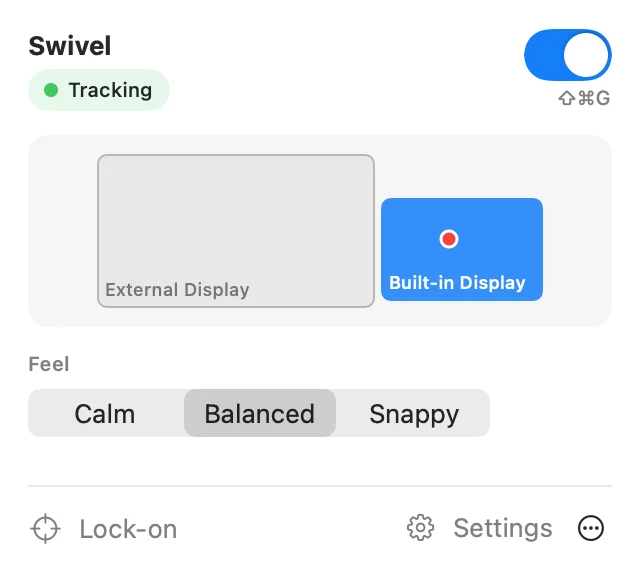
Swivel’s menu-bar panel: tracking is on, a map of two displays with the built-in display highlighted, and the Calm, Balanced and Snappy presets

BWH Monitor screenshot · StayAwake menu illustration

From the blog

Guides & tool picks

Practical how-tos for getting more out of your Mac and your servers.

All posts

Stay in the loop

Get new apps and guides first

Follow the BitColossus RSS feed in any reader. No email address needed, and nothing to unsubscribe from.